When you Google the “best of something”, you usually get lists that aren’t clearly based on something. Is it reviews, the author’s opinion, personal experience?
And if you ask LLMs, like ChatGPT or Gemeni, it's equally hard to understand what the answers are based on.
So, I’m going try and make things transparent here. I looked at the best visitor management systems and reviewed them based on 3 different factors.
- Overall user ratings
- Usability (visitor perspective)
- Features (admin perspective)
While I’ll try to keep an objective approach to what these systems offer, keep in mind that this is my personal evaluation. UIs that look ugly to me might be just what you’re looking for. Features that I consider important might be unnecessary for your business.
Consider this more of an analysis than concrete “buy this” advice.
You can disagree with some of my takes, but hopefully my POV will help you form an opinion of your own.
Also, this post is rather long, so I definitely suggest you check out the section that matters to you most. If you just want to read about each system, scroll down to the list. If you want to know how I chose these, keep on reading.
And, if you want to know more about me and my exact methodology, that info is at the bottom.
Below are the solutions I looked at, ranked by the criteria I mentioned.
 Archie
Best overall visitor experience for modern workplaces
Archie
Best overall visitor experience for modern workplaces
 The Receptionist
Simple, reliable front-desk replacement
The Receptionist
Simple, reliable front-desk replacement
 FacilityOS
Robust system built for complex operations
FacilityOS
Robust system built for complex operations
 Envoy Visitors
Popular choice for growing teams
Envoy Visitors
Popular choice for growing teams
 Kastle
Part of a broad security ecosystem
Kastle
Part of a broad security ecosystem
 Greetly
No-frills digital reception experience
Greetly
No-frills digital reception experience
 Lobbytrack
Good for regulated and high-traffic environments
Lobbytrack
Good for regulated and high-traffic environments
 Eptura Visitor
Enterprise-grade visitor management
Eptura Visitor
Enterprise-grade visitor management
A few weeks ago I also recorded this video where I go over what a visitor system looks like on both the user and admin sides, and also go over the top 5 solutions in the market today (the same I also cover in this post).
My factors for choosing these
Factor #1: User ratings
When I’m buying something on Amazon, the first thing I look at is the reviews. Well technically it's the price, but after that it's the reviews 🙂
A product with a 5-star rating based on 10–20 reviews doesn’t tell me much.
That could just be early buyers, friends of the brand, or people reviewing before real long-term use.
Once a product gets to around 100+ reviews, I start trusting it a lot more, enough people have bought it, used it, and taken the time to leave feedback for patterns to emerge. When a product has hundreds or thousands of reviews, I can be confident the rating reflects the real experience for most buyers, not just a small, biased group.
At the same time, there’s a point where the review count stops mattering as much. If a product has 1,000 reviews an another has 2,000, it doesn't change anything for me.
So I applied a similar principle when ranking these visitor management systems. Instead of treating all ratings equally, I used a log-weighted Bayesian score to balance review quality with review volume, giving more weight to products that have been consistently reviewed by a meaningful number of users, without letting sheer scale distort the rankings.
The final score is still mostly driven by the rating, but solutions with more reviews get a boost that gradually matters less as the review count increases.
Highest-rated visitor management software
Based on G2 ratings as of January 26, 2026
| Rank | Platform | G2 Rating | Final Score |
|---|---|---|---|
| 1 |
Archie
|
4.9 (206) | 490 |
| 2 |
The Receptionist
|
4.8 (432) | 480 |
| 3 |
Envoy Visitors
|
4.7 (434) | 471 |
| 4 |
FacilityOS
|
4.7 (243) | 470 |
| 5 |
Kastle
|
4.5 (155) | 428 |
| 6 |
Greetly
|
4.8 (21) | 408 |
| 7 |
Eptura Visitor
|
4.6 (176) | 437 |
| 8 |
Lobbytrack
|
4.6 (24) | 391 |
While I was at it, I asked Perplexity to visualize these results. This is what it came up with.
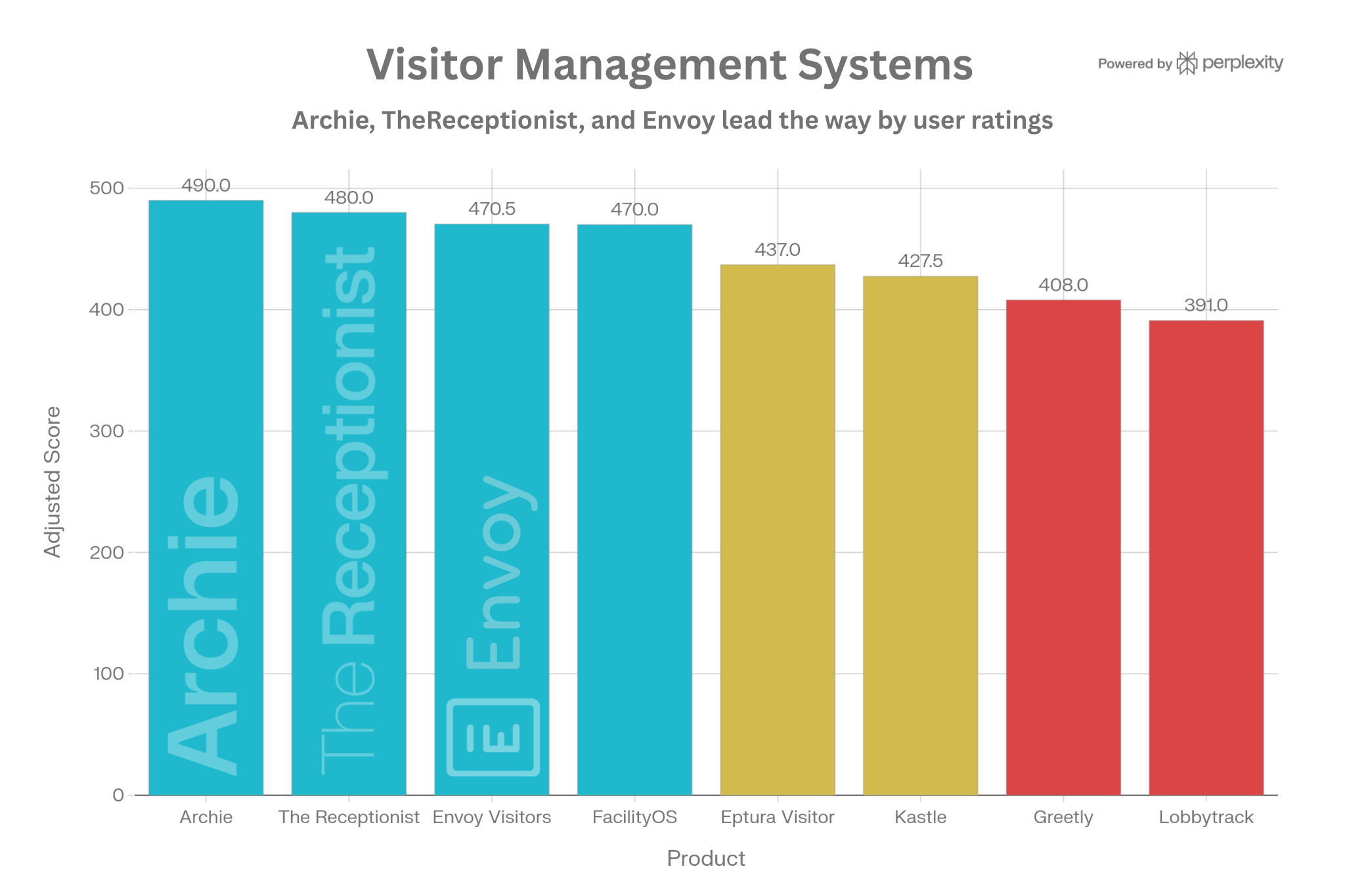
I see this factor as particularly important for visitor management systems because it's the closest thing we have to understanding real-world performance. Here's why customer ratings may matter even slightly more for a visitor app than other workplace software:
Reception staff experience
If your front desk team finds the system clunky or unreliable, they'll spend their day troubleshooting instead of welcoming guests. User reviews reveal whether the platform actually makes their job easier or creates more work.
Visitor first impressions
Your lobby is often the first physical touchpoint with your company. A confusing check-in experience or a crashed iPad sends the wrong message to clients, investors, and candidates. Reviews expose these friction points.
Reliability
When you're expecting lots of guests for an event and there are issues with the sign in system, you need support that responds promptly. Customer sentiment reveals which vendors actually deliver on their support promises.
Hidden operational costs
A system that requires constant admin intervention, frequent reboots, or manual workarounds wastes time. Reviews from other admins help surface these hidden costs that don't show up in feature lists.
Factor #2: Usability
Going back to my Amazon example above, after the price and the reviews, what I look closely at are pictures and videos of the product.
In the case of visitor management software, this translates to their UI on the user and admin side. When looking at usability, I evaluated 3 things:
- Interface: Is the UI intuitive and does it look modern for both users and admins?
- Ease of use: Can users check in quickly without confusion, and can admins find what they need without having to contact support?
- Device flexibility: Can businesses use different tablets (iOS/Android), and can users check in with QR codes?
The great thing is that most systems have very modern UIs on the visitor side, so you won’t have to worry about your visitors getting confused.
But even in those cases there are some differences...
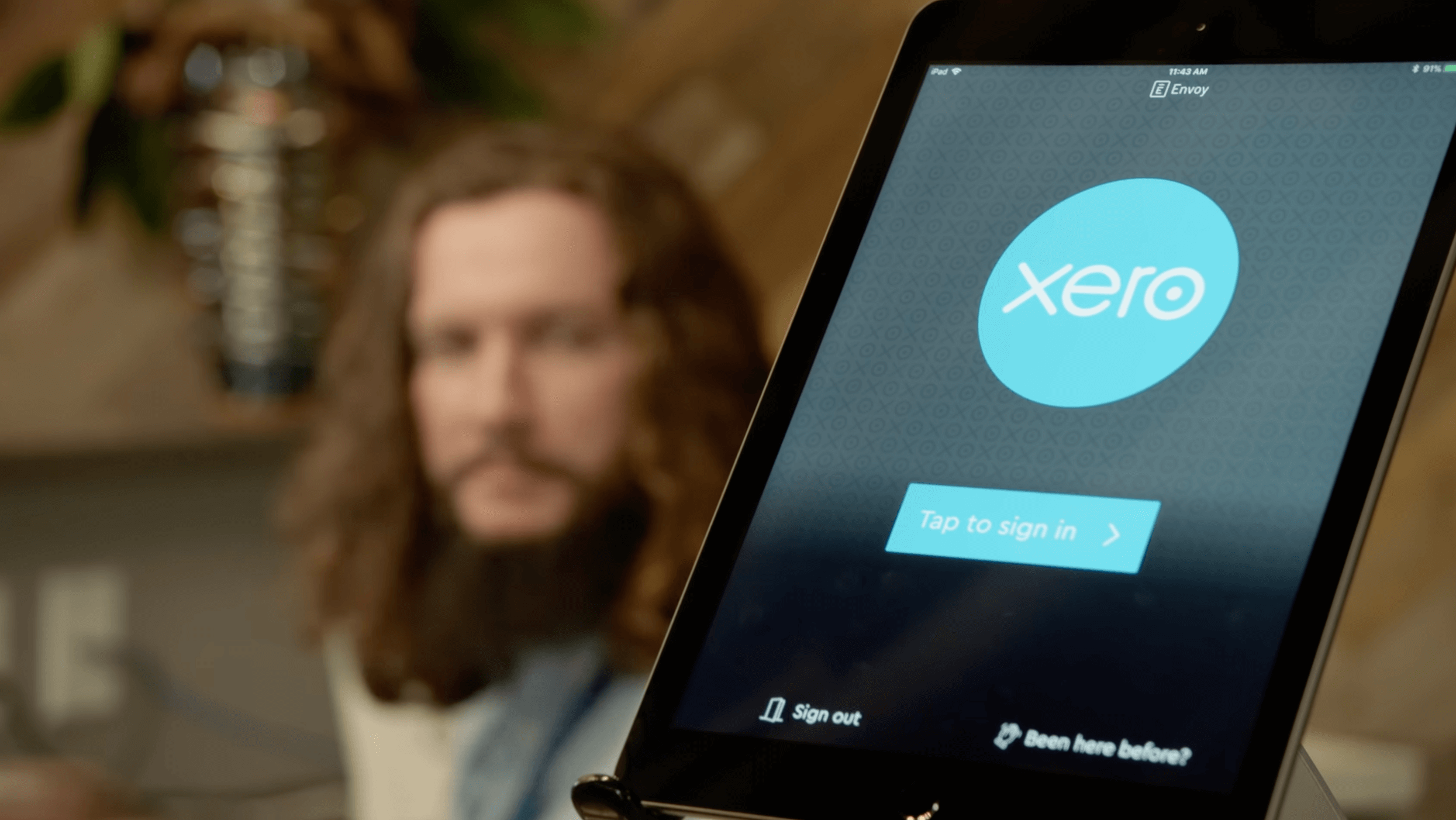
This is Envoy’s visitor app:
And this is Kastle’s:
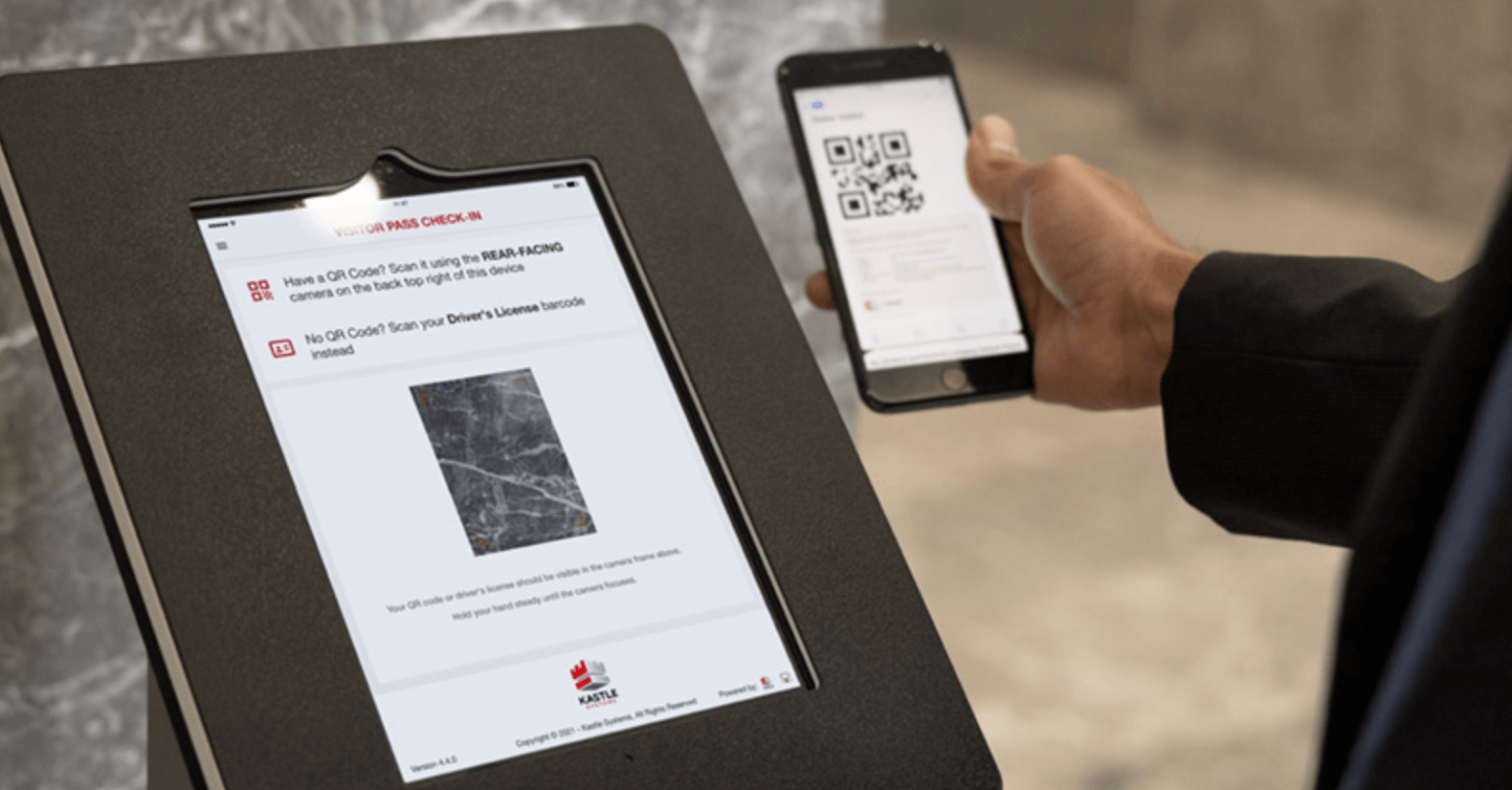
I personally think Kastle’s interface looks dated and generally not attractive. This may not impact the sign in process itself, which might be just as straightforward as other solutions, but it does have an impact on branding and making a great first impression.
In comparison, when you look at Envoy, it’s much cleaner and a lot nicer, or at least that's my opinion.
✨ Fun fact: the person you see in the background in the Envoy picture is a First Impression Coordinator - that is their actual job title! So yea I bet to them how the visitor app looks like matters a lot, even if there was no impact on usability.
Factor #3: Features
There are key features, like badge printing and host notifications, that should be expected in every software.
But this is where it gets complex. Different companies want different features and functionalities.
- A company might just want a simple system to register guests and take some workload off the receptionist
- Another company might want very specific security and compliance features
- One company also wants a complete solution for desk booking, including visitor management
- Another might want a turnkey approach to their devices, so they don’t have to manage any of the technical stuff
My point is that there are tons of use cases, and every solution offers something extra, while it might not have a feature that’s important to you. The good thing is that most of the time, every system has all the basic features, so that it works for most use cases.
And, that’s why I mostly focused on the core features these tools offer, while taking into account the devices they support and the customization options available. This is probably the most subjective of the factors, so let’s actually look into the numbers to help you understand my logic.
Best Visitor Management Systems Reviewed
#1 Archie

🤩 What I like: Sleek interface and robust security features at a competitive price
👎 What I dislike: Limits to how you communicate with visitors when they arrive (it's possible via Teams, but mainly before the visit)
👀 What stands out: Emergency and security features are included in the Pro plan, and are not paid add-ons
Archie overview
Archie is an all-in-one workplace management tool that also provides a complete visitor sign in solution with all the core features and plenty of extras that I wasn’t able to find in other systems at this price point.
To me, it’s really impressive how the platform includes security features, like NDAs and e-signatures, along with the usual (badge printing, contactless check-ins, etc.), and also offers desk booking and room management as additional add-ons.
The interface, both for users and admins, is modern and intuitive, which, as I’ll mention below, isn’t something that’s always true.
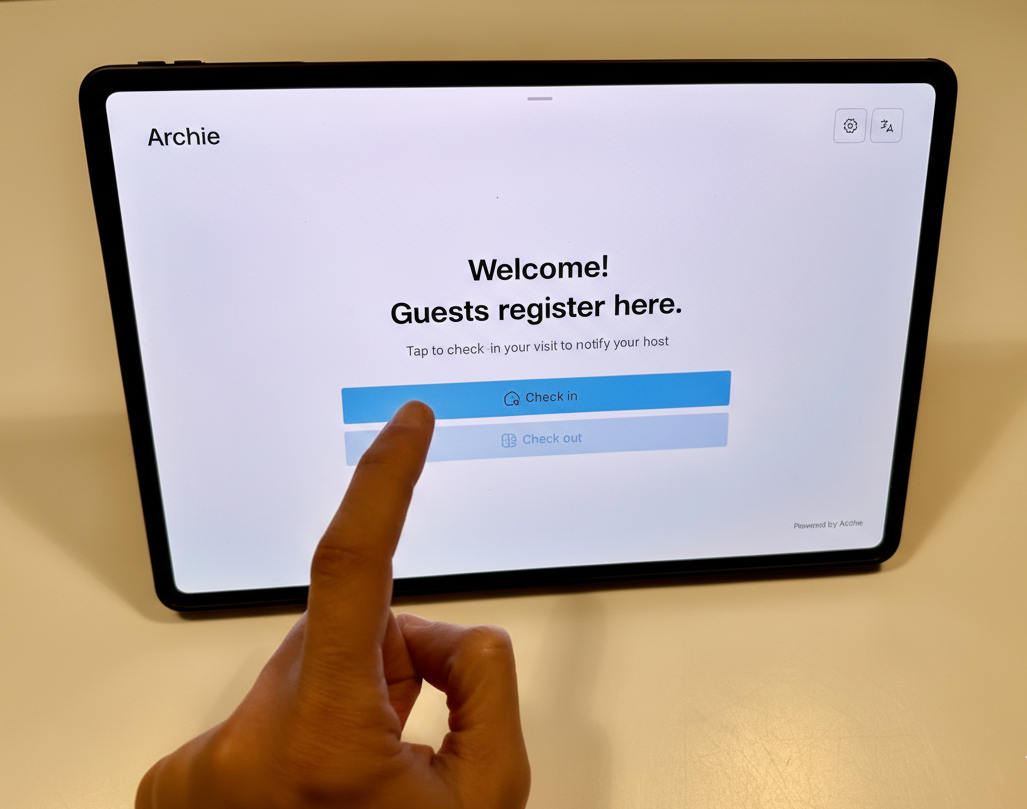
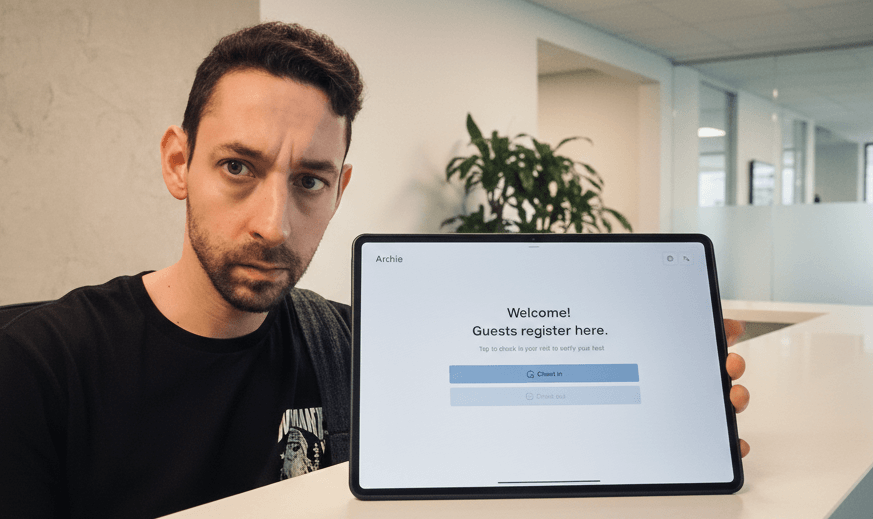
Me using the app on a Honor Magic Pad 2
What Makes Archie Different:
While I’d say that its all-in-one approach is enough of a differentiator, Archie stands out for its complete feature set that delivers strong security within its core platform. Its Pro plan provides features like SSO/SCIM, NDAs, access control integrations, and evacuation tools, most of which are usually add-ons, even in the best platforms I’ve reviewed.
Features Deep Dive:
- Guest registration: Guests can pre-register to make check-ins faster. I find this a really important feature, as it saves a lot of time when you have multiple visitors coming in at the same time.
- Contactless QR code check-in: Visitors receive QR codes via email that they scan to check in. Again, this is one feature that is a plus for me, as it makes check-ins even faster.
- Digital forms & e-signatures: Visitors sign NDAs, safety waivers, and custom legal agreements when they check in. Archie’s dashboard does a great job at managing these, in my opinion, allowing you to add them to different visitor types.
- Custom visitor flows: Speaking of visitor flows, you can add different steps for different visitor types. So, if someone is visiting for an interview, they’ll get to sign NDAs on the kiosk, while contractors can sign their contracts there.
- Emergency alerts & roll calls: During emergencies, admins can trigger instant alerts to everyone on-site via SMS or email. To me, this is one of the most important security features, to make sure both visitors and employees stay safe.
- Detailed visitor logs: Archie keeps logs of all visitors that you can filter based on the type of visit. This is helpful in terms of compliance and visitor reports.
- Instant host notifications: One of the features I really like on Archie is that hosts get instantly notified when a visitor checks in via email, SMS, Slack, or MS Teams. It makes the whole visiting experience a lot smoother.
- Easy integrations: Native connections with Microsoft Teams, Slack, Outlook, Google Calendar, and major access control systems (Kisi, Salto, Brivo).
- Branding & UI control: Customize the entire visitor-facing experience with your logo, colors, and welcome messages. Tailor badge templates, email notifications, and tablet screens to match your brand.
Devices:
- iPads and Android tablets for visitor check-ins
- iOS and Android mobile apps for employees (optional)
- Web-based admin portal
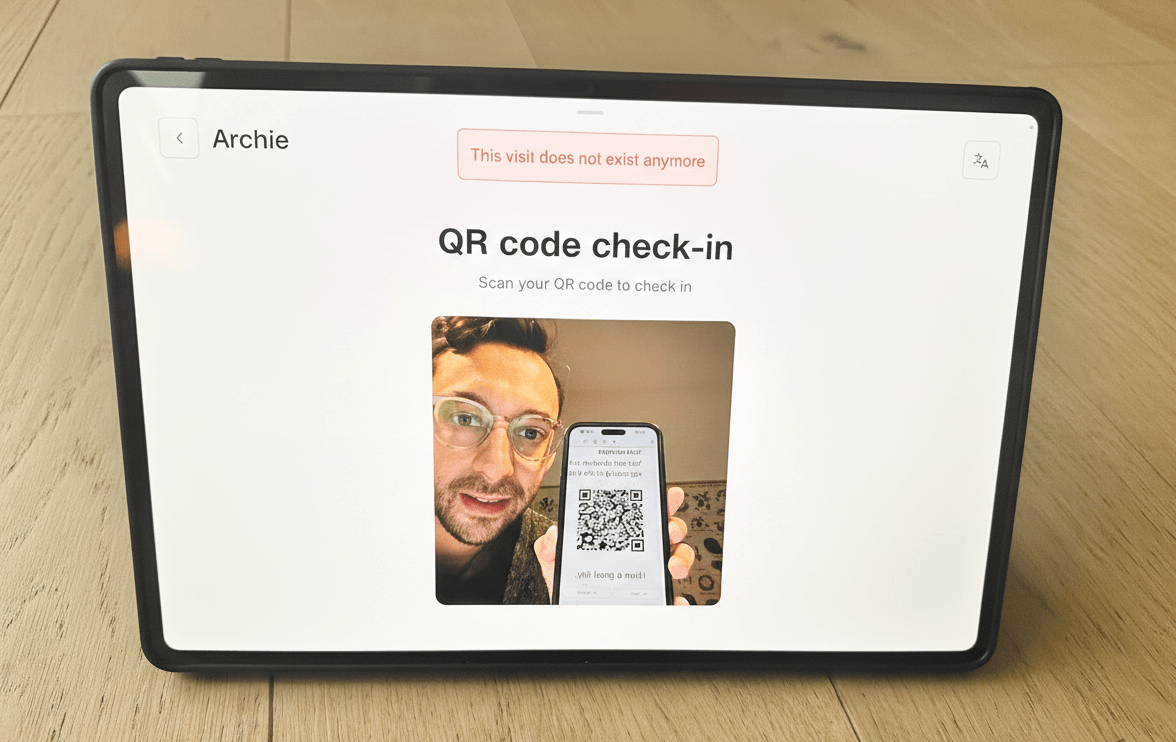
Me testing the QR code function for pre-registered visits.
Pricing
Archie offers 2 base plans and one enterprise plan for visitor management:
- Starter: $109 per office/month. I find this ideal for small and mid-sized organizations that want a solid visitor check-in system, as it includes all the core features, like badge printing, host notifications, and e-signatures, with no visitor cap.
- Pro: $185 per office/month (billed annually). This one combines more premium features at a competitive price. Pro includes everything in Starter plus multiple locations, SSO & SCIM, emergency evacuations, brand customization, and advanced integrations.
- Enterprise: Custom pricing. This works great for larger operations in my opinion, as it comes with a lot more advanced features, like block lists, premium API support, and migration support.
Who Should Choose Archie:
- Mid-sized companies (50-500 employees) that need visitor management plus desk booking or meeting rooms in one unified platform. I believe Archie combines all these modules together well and helps you avoid managing multiple vendor relationships.
- Organizations with security requirements but without enterprise budgets. As I mentioned above, Archie includes NDAs, access control, and compliance features in base pricing that competitors gate behind premium tiers.
- Companies prioritizing ease of use who want a system that's fully operational in days, not weeks, with minimal training required for reception staff and minimal ongoing IT involvement
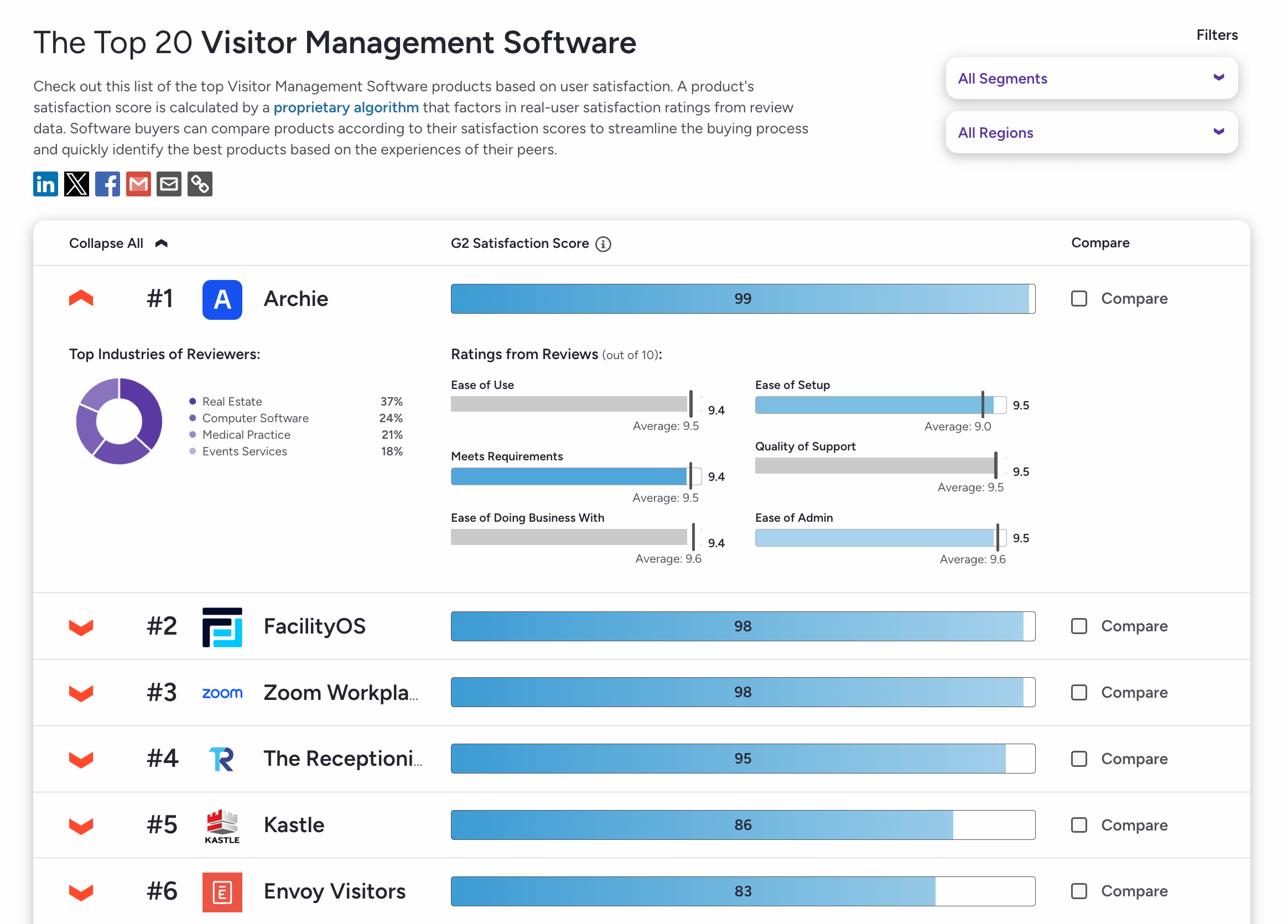
Additionally, at the time of writing Archie ranks as the highest rated visitor management system on G2...
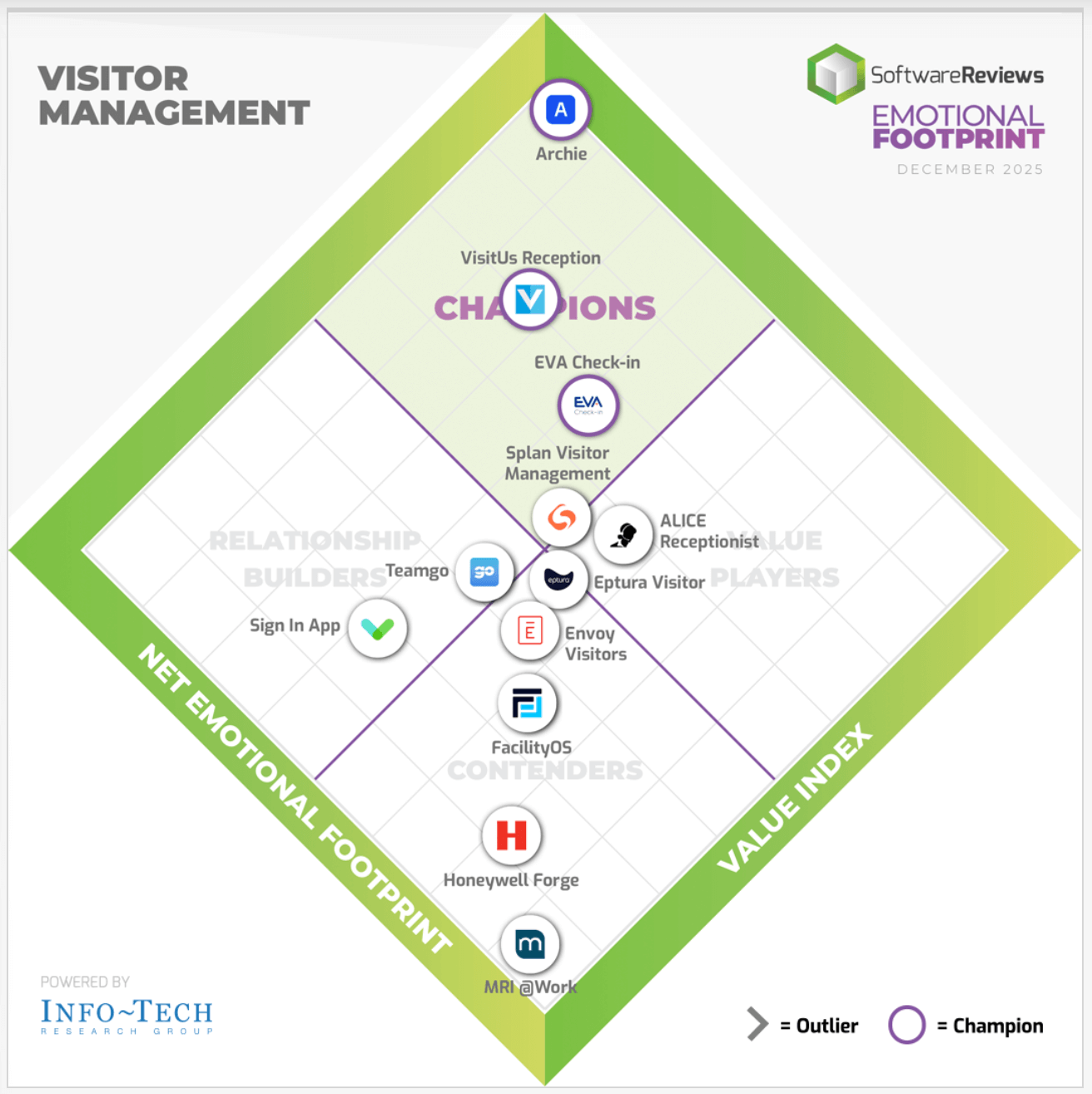
As well as the #1 solution in SoftwareReviews's Emotional Footprint quadrant, which tracks how customers feel about the product and company as a whole, from the buying experience to support and beyond.
#2 The Receptionist for iPad
🤩 What I like: All the features are included in each plan, with prices scaling as you grow; I think this works great for smaller teams that still want a full VMS
👎 What I dislike: Limited for security-heavy use cases, as SSO costs extra and access control needs custom API work
👀 What stands out: Two-way messaging between visitors and hosts shows responses right on the kiosk screen
The Receptionist Overview
The Receptionist for iPad is another visitor management system that’s used by different companies because of its simplicity and reliability. It only works with iPads, which I don’t really like, and the admin UI isn’t the most beautiful out there. But what I find great about it is that it offers all of the core features at a rather affordable price.
And, while writing this post, the platform was acquired by Sign In Solutions. I am very excited to see this, as they’re bound to start offering a more complete workplace platform with AI functionalities included. It’s going to be interesting to see how that works out compared to tools like Archie or Envoy that offer all-in-one workplace management systems.
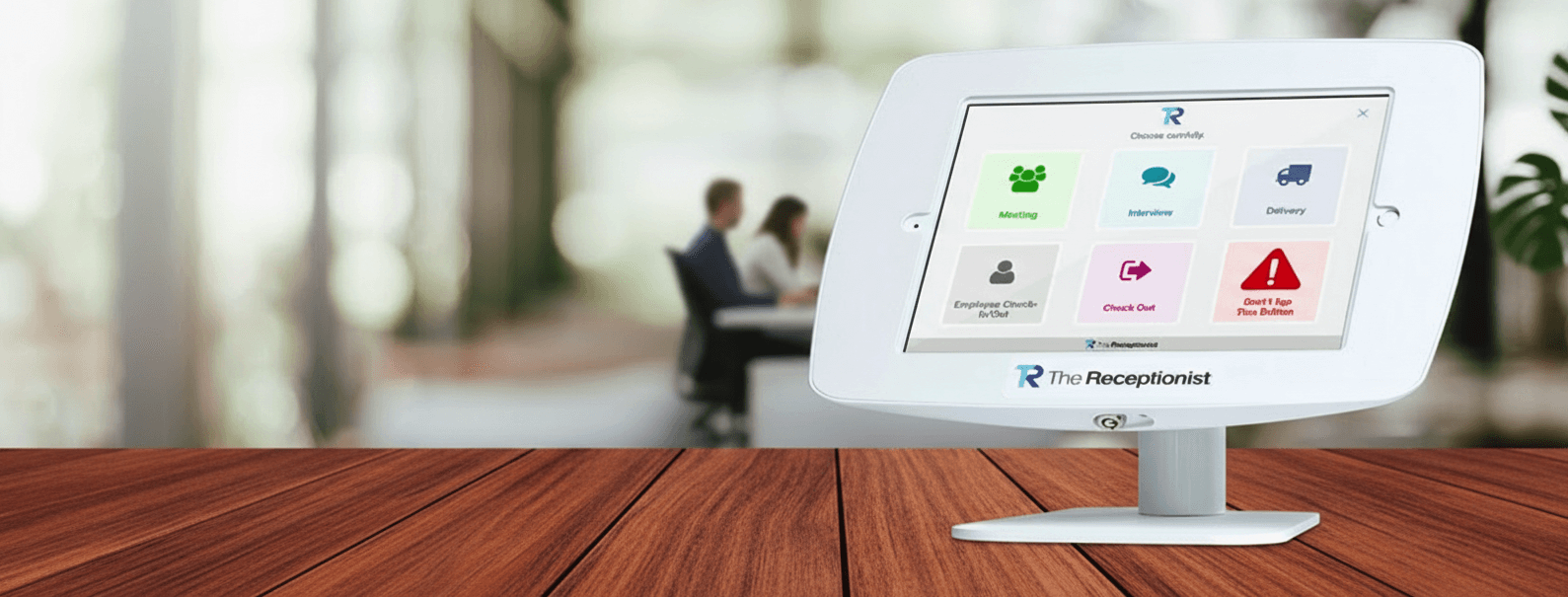
TheReceptionist offers complet bundles of iPads and different enclosures and mounting hardware.
What Makes The Receptionist Different:
While researching The Receptionist, one thing stood out to me. It’s very simple to use for visitors and set up for admins. I find this important because it’s mostly used by smaller teams that won’t have all the IT resources to configure new tools in their workspace.
In terms of actual features, there’s a clear winner, and that is the two-way messaging feature. With most VMS, hosts get a notification, and that’s it. The Receptionist lets guests and hosts communicate with each other, allowing the host to give more personalized instructions to specific visitors.
Features Deep Dive
- iPad kiosk: The Receptionist is only compatible with iPads, which I don’t particularly like, but could work with your setup. Besides the device limitation, the iPads have all the core functionalities, so that’s great.
- Two-way messaging: I have to mention the platform’s standout feature again: two-way messaging between hosts and guests. Hosts can directly reply to guests when they check in, and I like how simple and smooth that works within the tablet.
- Pre-registration via email invites: Hosts can send invitation emails to visitors before their arrival. The invite includes visit details, check-in instructions, and any required legal documents to review in advance.
- Custom workflows: Button-based flows for different visitor types, including guests, interviews, deliveries, contractors, and employees. I don’t find the way it looks on the admin side great, but it works, and it looks great for users.
- Customizable legal agreements: Much like Archie, The Receptionist allows you to create documents that guests can sign during their check-in process. You can add different templates to different visitor types, which I like, in terms of usability.
- Employee PINs: Staff can check in and out with a PIN for basic presence tracking. As a VMS feature, this is pretty useful for offices that don’t have desk booking, so that they know who’s on-site at all times.
Devices:
- iPad for primary check-in interface (iPad-only, no Android support)
- Web-based admin portal
Pricing:
The Receptionist charges per location, with pricing based on how many employees receive visitors. All software features are included on every tier:
- Basic: $60/month for 1-24 employees
- Premium: $114/month for 25-49 employees
- Pro: $210/month for 50-99 employees
- Executive: $360/month for 100+ employees
SSO is available as a paid add-on.
Who Should Choose The Receptionist:
- Small to mid-sized businesses (10-200 employees) that need a VMS up and running today, with something so simple that temporary front desk staff can use it without training
- Offices where visitor check-in needs to be reliable and professional, but doesn't require extensive compliance features like ID scanning or watchlist screening
- Organizations with basic visitor management needs that want affordable pricing without sacrificing quality, while wanting reliability and quick rollout.
#3 Envoy Visitors
🤩 What I like: Purpose-built for visitor management with unmatched polish and reliability
👎 What I dislike: Premium pricing puts it out of reach for budget-conscious, smaller businesses
👀 What stands out: Tons of security and compliance features at a transparent price point
Envoy Visitors Overview
I couldn’t create any piece of content about visitor management systems without mentioning Envoy. The platform was one of the first to really push for a cloud-based approach to visitor management, and while the offer complete workplace tools now, their VMS, Envoy Visitors, is still one of the best in the market.
From demos I reviewed, the check-in experience is very polished, and the UI looks great: modern and easy-to-use, while also being very intuitive. The only thing I don’t like about it is that Envoy only supports iPads (though visitors can check in through the mobile app, which is a plus).
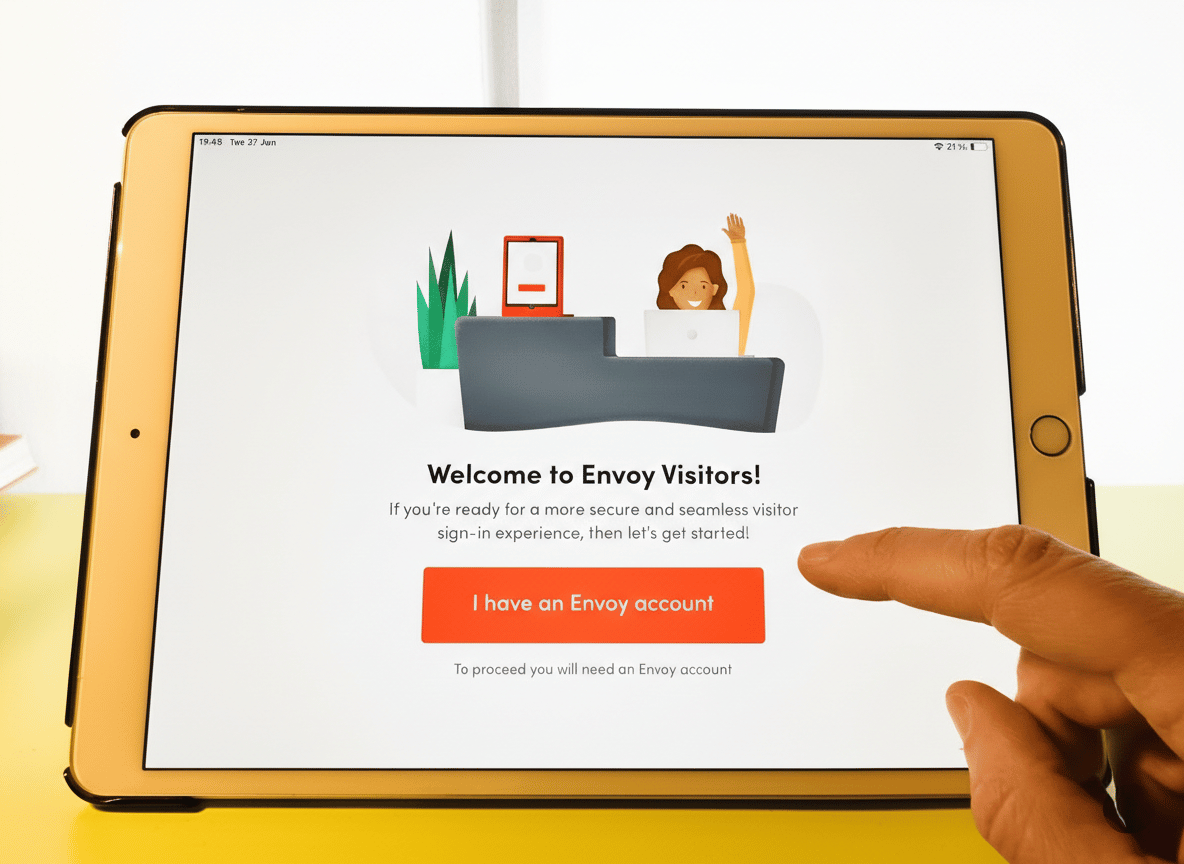
I switched to an iPad as the app is not available on Google Play
What Makes Envoy Visitors Different:
Envoy is different in its legacy as one of the top visitor solutions for so many years and as one of the first to really push a modern platform. While I could list a few different things that make it great, the true differentiators are its security features. While most of these are gated behind the enterprise plan, which I don’t particularly find great, I’ll still give Envoy a plus for providing blocklists, ID scanning, facial recognition check-ins, and multi-location management.
Features Deep Dive:
- Pre-registration and contactless check-in: Hosts pre-register visitors via email or calendar integration. While I have found this feature in many other VMS, I really like how visitors can use the QR codes to check in through the Envoy app, without having to use the iPad.
- Photo capture and ID scanning: Visitors can take high-quality photos at check-in for security purposes and print badges. I really like how Envoy takes it a step further by offering ID scanning for high-security environments, which captures government ID information and verifies identity.
- Digital legal agreements: Visitors sign NDAs, confidentiality agreements, safety waivers, and custom legal documents digitally on the iPad. The system supports version control, conditional logic for different visitor types, automatic expiration and renewal reminders, and legally binding signatures with audit trails.
- Easy integration with communication tools: Envoy integrates with tools like Slack and Microsoft Teams, enabling instant notifications and efficient communication between hosts and visitors. When a visitor checks in, hosts receive notifications via their preferred channel with the visitor's photo, purpose of visit, and a button to remotely unlock doors if access control is integrated.
- Advanced security features: Includes watchlist alerts and photo capture for enhanced protection. Screen visitors against custom watchlists, organizational blacklists, and security databases with automatic alerts to security teams when flagged individuals attempt to check in, essential for high-security environments.
- Access control automation: Much like other VMS, Envoy has native integrations with Kisi, Salto, Brivo, and Openpath for access control. Visitors receive time-limited access to specific areas that automatically expires at sign-out or scheduled end time, with security teams seeing real-time access activity alongside employee access.
- Visitor logs and analytics: Detailed visitor data, including patterns, duration of stay, peak visit times, and visitor demographics. Comprehensive audit trails showing who visited when, which host they met, how long they stayed, and which areas they accessed via door readers. Logs are searchable, filterable, and exportable for compliance reporting.
- Multi-location management: Manage visitor check-in across unlimited locations from one central dashboard. Each location can have custom branding, forms, badge templates, and access rules while maintaining centralized reporting and security oversight.
Devices:
- iPad app (primary check-in interface, iPad-only)
- Visitor mobile app (Android/iOS for pre-registration)
- Web-based admin portal
Pricing:
Envoy offers pricing plans to meet different workplace needs:
- Basic: Free, includes unlimited visitors and host notifications, with up to 50 employees. While this is great to test Envoy out, I think there are better free options and affordable ones with plenty of features that are ideal for small workplaces with simple needs.
- Premium: $329/location/month (billed annually), includes custom branding, visitor photos, analytics, SSO, and directory integrations for a professional, data-driven experience.
- Enterprise: Custom pricing includes advanced security features like block lists, ID scanning, access control integrations, emergency alerts, and scheduled reports for high-security workplaces.
Note: until recently Envoy offered an entry level tier that was much cheaper than the Premium pricing, but also offered a lot less. Now that plan has been removed.
Who Should Choose Envoy Visitors:
- Organizations with security or compliance requirements that demand audit trails, access control automation, watchlist screening, and legally binding digital agreements without compromise
- Mid-sized to enterprise businesses (200+ employees) that receive high visitor volume and need a system that won't crash during peak times, with reliability and support responsiveness prioritized over the lowest price
- Companies planning to scale that want a platform growing with them as they add locations, with proven reliability at enterprise scale and comprehensive feature depth
#4 FacilityOS
🤩 What I like: It easily combines with other FacilityOS products.
👎 What I dislike:
Some of the “core” features from other systems aren’t available in the base plan
👀 What stands out: Ships with ready-to-use managed hardware and software
FacilityOS Overview
VisitorOS (formerly known as iLobby, part of the FacilityOS suite) is a visitor management system designed to make workplaces more secure and organized. FacilityOS has a few other modules for contractor management, as well as emergencies and deliveries, but I want to focus more on VisitorOS, as it’s the true VMS out of all of them.
It’s definitely more geared towards security-heavy workplaces that’ll need all of the modules, but VisitorOS can work as a standalone system for offices or industrial sites.
What Makes FacilityOS Different:
Out of all the VMS I’ve reviewed, VisitorOS is the only one that provides a managed iPad as a check-in device. I think that this works well with security-heavy workplaces, as it makes the setup faster and more secure, but it can also be bad for teams that want to use Android devices, which are, in some cases, more affordable.
Also, speaking of security, the rest of the modules under the FacilityOS name are great to efficiently manage deliveries, contractors, and emergencies, but come at a higher cost and have some features you can usually find in other tools like Archie or Envoy.
Features Deep Dive:
- Ready-to-use visitor management software and hardware: Every plan includes a 10.9″ iPad with Mobile Device Management (MDM) and an anti-theft mount, with pre-configured hardware and software for easy setup. One thing I like about this is that the team provides ongoing support and repairs for the iPads, which saves a lot of time.
- Pre-registration and notifications: Visitors can pre-register before they arrive using email invitations with visit details and access instructions. In the base plan, this is only available as an add-on, but it’s included in the Enhanced plan. Hosts receive instant alerts via SMS, email, or call notifications when guests check in.
- Active Directory integration and SSO: VisitorOS’ base plan includes Active Directory integration and Single Sign-On, which I’ve found to usually be an add-on or only included in higher tiers in other visitor management systems.
- Customization: VisitorOS offers some basic customization options to personalize your sign-in process with your own branding, alongside videos and images. I think it works great, despite not being as detailed as other visitor management systems.
- Badge printing with templates: Professional badge printing with highly customizable templates. This is only available as an add-on, but it’s included in the Enhanced plan. Badges are also printed in black and white, which I find to be a bit ugly. But there’s an add-on for color badge printers on the Enhanced and Enterprise plans.
There are also plenty of add-ons for both base plans, like:
- Photo ID scanning and verification
- Watchlist screening
- Slack and Microsoft Teams integrations
Devices:
- iPad (10.9″) with MDM and anti-theft mount (included)
- Web-based admin portal
Pricing:
The Corporate Plan starts at $199/month and includes everything to get started: a 10.9″ iPad with Mobile Device Management (MDM), an anti-theft mount, and pre-configured hardware and software for easy setup. It supports unlimited users and sign-ins and offers features like SMS, email, or call notifications, a mobile app, Active Directory integration, SSO, and secure hosting on Microsoft Azure. Ongoing support, including hardware repairs and training, is also included to keep things running smoothly.
For added features like touchless sign-in, pre-registration, or badge printing, the Enhanced plan starts at $275/month.
One thing I have to note is that, while pricing starts around $199/month, there are a lot of features that are offered as add-ons. Many of these, like color printers and communication tool integrations, are part of the base plans in most visitor management systems, so I think the pricing can get quite expensive for small and even mid-sized teams that want these features.
Who Should Choose VisitorOS:
- Enterprises in regulated industries (finance, healthcare, government, defense) that need enterprise-grade compliance and security features, including ID scanning, watchlist screening, and flexible workflows supporting strict security requirements
- Security-heavy workplaces like corporate, industrial, or government sites that want ready-to-use hardware and software setup with no long deployment time or technical configuration required
- Companies with dedicated facilities or security teams that can justify higher pricing for comprehensive compliance features, reliable hardware, and white-glove support
#5 Kastle Systems
🤩 What I like: Unified access control and visitor management, no third-party integrations needed
👎 What I dislike: Feels more like legacy software with older tech stack and less polished interface
👀 What stands out: One vendor handles access control, visitor management, and video surveillance across sites
Kastle Overview
Kastle is a legacy software that isn’t as good-looking or as well-optimized for offices. To me, it feels a bit “old tech”. But, I think it’s pretty fair to list it here, as it is one of the most complete security tools that works great with certain corporations that need this. If you're already using Kastle for access control, their visitor management integrates seamlessly because it’s pretty much one system that integrates with itself.
What Makes Kastle Different:
Kastle is designed for security-heavy organizations that want a single vendor to handle access control, visitor management, and video surveillance across multiple sites. Unlike all of the other visitor management systems I’ve mentioned, Kastle provides a complete security stack that can work well with specific use cases (more on these below).
Features Deep Dive:
- Calendar-based invites: Hosts can send out calendar invites from Outlook or Google Calendar. What I find great is that the system syncs with Kastle’s access control, so specific visitors can only have access to certain parts of your facility.
- Automatic QR access codes: Guests receive QR codes in their emails, which they can use to check in. This is a pretty common feature, but I was surprised to see it here, since it’s usually found in more modern visitor management systems. Definitely a plus in terms of functionality.
- Vendor PIN codes and delivery handling: Host can issue unique PINs for deliveries and service vendors, like daily delivery service providers, to make receiving packages easier.
- myKastle admin portal: The web-based admin portal allows visitor authorization by typing names in the text field, viewing today's visitors with time parameters, accessing visitor history and reports with filtered views, and managing access permissions across locations. I think the interface is a bit dated, but it is functional and is designed for security administrators rather than reception staff.
- Multi-site management: Manage visitor access and security across multiple buildings, campuses, and locations from the centralized myKastle portal. Each location can have unique access rules while maintaining unified security oversight.
Devices:
- Lobby kiosks (custom hardware)
- KastlePresence mobile app (iOS and Android)
- myKastle web-based admin portal
Pricing:
Kastle doesn’t have any public pricing for its VMS or security solutions. You’ll have to contact their team and get a quote based on the number of locations and doors, along with the services and hardware you’ll need. While I don’t like custom pricing, this is the reality for most enterprise-level tools.
Who Should Choose Kastle:
- Security-heavy organizations that want one vendor to handle access control, visitor management, and video surveillance across many sites, eliminating vendor coordination complexity
- Multi-site enterprises that need unified security management across corporate campuses, office buildings, or property portfolios with centralized oversight and 24/7 SOC monitoring
- Companies with dedicated security teams who value reliability, strong support, and unified access management over interface polish, and can work with legacy software in exchange for comprehensive customization options
Some honorable mentions
Greetly
Greetly is a visitor management system designed for small to mid-sized teams that want an affordable, branded iPad check-in that feels like a virtual receptionist.
One aspect that really stood out to me about Greetly is its customization. The whole check-in experience can be customized with your branding, using a drag-and-drop editor, which makes things so much easier.
Also, on top of this, I was surprised to see that Greetly offers a 2-way messaging system, like The Receptionist, meaning that the host can communicate with the guests right after they check in through the kiosk.
All plans include unlimited users, check-ins, and notifications, with the Essential Plan at $99/month (billed annually) and Pro Plan at $159/month (billed annually), adding badge printing, two-way messaging, ID/driver’s license scanning, and multi-kiosk support.
Greetly is definitely one VMS I’m looking more into, as they get more reviews. They’ve got tons of enterprise features at a very competitive price. That’s why I believe it’s especially great for small and mid-sized offices.
Lobbytrack
Lobbytrack is a visitor management system designed for smaller organizations that want a flexible, cross-platform visitor system with room to grow.
What caught my attention about Lobbytrack is its device compatibility. While most VMS lock you into iPads, Lobbytrack runs on iOS, Android, and Windows kiosks, which means you can choose devices that fit your budget without being forced into one ecosystem.
Another thing I found interesting is how they handle different user roles. Reception staff, employees, and security guards each get dedicated apps tailored to what they actually need to see and do, reducing confusion and keeping workflows clean.
And one note on pricing is that there’s a free plan with limited features. But it can also include all features if you have up to 20 visits per month, which is incredible for very small teams.
Pricing is tiered based on features: Starter (Free, limited features), Basic ($50/month/location), Professional ($100/month/location), and Enterprise (custom pricing), with advanced options like ID scanning, watchlist checks, and evacuation tools on higher tiers.
Eptura Visitor
Eptura Visitor (formerly Proxyclick) is an enterprise visitor management system built for large, regulated, multi-site organizations that are happy to roll out a heavier enterprise platform.
What impressed me most about Eptura is the workflow customization. The drag-and-drop editor lets you build custom check-in processes for different visitor types, like guests, contractors, or deliveries, without touching code, which gives you lots of flexibility.
Beyond that, the compliance and security capabilities are pretty impressive. Watchlist screening, ID verification, emergency protocols, access control integrations, and detailed audit trails are all built to meet the demands of regulated industries in ways that simpler platforms just don't address.
Eptura Visitor has two main plans (Advanced and Power) with prices not listed publicly. Based on my research, estimates put it around $7,500/year for base setup plus separate implementation fees, depending on your configuration and integrations.
How to Choose Based on Your Needs
Ask yourself:
- Is visitor management your primary need, or do you also need desk booking and rooms? If you need a complete workplace platform, consider Archie. If it's purely visitor management with the highest polish, check out The Receptionist or Envoy Visitor.
- How important is security and compliance? For regulated industries requiring watchlist screening and immutable audit trails, FacilityOS is, in my opinion, the one that balances usability with security features.
- Do you want managed devices or more flexibility? If you prefer managed hardware that arrives pre-configured and ready to use, FacilityOS ships with everything included. If you want to use iPads or tablets you already own, Archie, Envoy, or The Receptionist let you bring your own devices (although many vendors only support Apple devices, so keep that in mind).
- What's your budget and company size? For small businesses (under 50 employees) with basic needs, The Receptionist offers affordability at $60-210/month. For mid-sized companies (50-500 employees), Archie at $109-185/month offers the best feature-to-price ratio. At enterprise level you'll likely end up in custom pricing, but with some solutions the standard pricing model will still apply.
- Do you need one vendor for everything security-related? If you want access control, video surveillance, and visitor management from a single provider across multiple sites, Kastle eliminates vendor coordination complexity with their managed security stack.
Final Recommendation
For most companies implementing visitor management, I'd start by evaluating Envoy, Archie, and The Receptionist. These three offer the strongest combination of reliability, usability, and user satisfaction.
If you need enterprise-grade compliance, add VisitorOS to your shortlist despite the higher complexity and cost.
If you want a complete security solution, Kastle has access control and a VMS that integrate well within its security tech stack.
If budget is the primary constraint, Greetly delivers professional visitor management without enterprise pricing, and Lobbytrack and Envoy both have limited free plans.
I hope this extensive research saves you time and helps you make a more informed decision. Choosing a visitor solution might seem straightforward, but getting it right makes a significant difference in how visitors perceive your organization and how efficiently your operations run. I recommend booking demos with your top 2-3 choices to see which fits your specific requirements best and try the apps and admin dashboards yourself if you have the capacity to do so.
Methodology
Over 60 different sources were used to put together this content. Resources reviewed directly include company websites, product documentation, G2 and Capterra review platforms, vendor comparison sites, and demo videos.
Like any research, this analysis is prone to error, but maximum accuracy was prioritized for all information stated at the time of writing. Since publication, vendors may have changed their offerings.
All data was collected between January 10 and January 27, 2026. For future updates, additional timestamps will be included in the methodology.
If you have feedback regarding this content, feel free to reach out via my contact page.
About me, the author
My expertise in this area comes from professional experience in the workplace technology space, but I would argue that anyone can easily test visitor solutions and get a good idea of how they work even if they are totally new to this type of systems.
I currently lead marketing efforts at Archie, and it's important to transparently disclose this affiliation. I previously worked at Kisi, an access control company that integrates with workplace tools, including some of those reviewed here, like Envoy and Archie, among others. During that time, I also ran Coworking Resources, a publication focused on flexible workspace technology.
I've aimed to provide objective analysis based on public data, user reviews, and documented features. You’ll notice that I haven't avoided mentioning areas where competitors have advantages over Archie. Transparency builds trust, and I hope you find this approach valuable.
Freelance writer Alexios Georgakopoulos has helped with the editing process of this content piece, and you can just assume anything great about it is thanks to him, and anything that looks off is because of me.