As a content creator, I've used Loom for a long time, but I recently switched to Tella. Here I want to compare the two solutions and help you understand which one is best for you. If you don't want to bother reading the whole thing, my takeaway is:
- Tella is a way better tool if you create content or share videos externally.
- Loom is a better tool if you exclusively record for internal purposes.
- For mixed use cases (eg: you mostly record internally but sometimes share videos on social media, send them to investors, create tutorials, etc.), then Tella is the best choice.
You can also look at the product tour below on how I use Tella for all of my videos.
30% off tella
If you buy a licence after your free trial with this affiliate link
Tella Review: Is it the best alternative to Loom?
I loved Loom. But when I discovered Tella, I canceled my subscription right away. Loom is still a great tool, but Tella is what I needed. Let me tell you why.
User-Friendly Interface and Quick Setup
Tella's ease of use is a highlight for me. The platform's intuitive interface allows for quick video selection and editing. After recording, I can in a few seconds change the layout of my video and perform basic edits, and in a few minutes I can apply more advanced changes like zoom effects, inserting external clips, and so on.
Versatility in Video Creation
Tella is more than just a screen recorder; it's a creative tool for various video types, including tutorials, courses, and product demos. This aligns perfectly with my need for a flexible tool that adapts to different content requirements. The platform's evolution from a collaborative video editor to a more focused screen recorder highlights their commitment to refining user experience.
Customization and Editing Features
The customization options in Tella have been a game-changer for me. The platform offers diverse layout choices, making it simple to tailor videos to specific content needs. Users have lauded Tella's multi-layout views and zoom features, enhancing the visual appeal of videos.
Recording and Sharing Capabilities
Tella supports various recording methods, including using their Mac app or Chrome extension, which I find particularly useful for creating content across different devices. The platform also simplifies video sharing and downloading, a crucial aspect for creators who distribute content on multiple channels.
Evolution
The platform's evolution shows a clear trajectory towards meeting the specific needs of creators and entrepreneurs. This community-driven approach to development is reassuring and aligns with my values as a content creator.
Core Features of Tella

1. Recording Options
- Web App, Chrome Extension, and Mac App: Tella offers multiple recording options, which includes a web app, a Chrome extension, and a dedicated app for Mac users.
- Screen and Camera Recording: Tella's online screen recorder enables simultaneous screen and camera recording, with the possibility to select only a portion of the screen right during the recording, or crop it later.
2. Editing Tools
- Layout Customization: Tella provides a variety of layout options. You can choose how to display the screen and camera feed - full screen, split-screen, picture-in-picture, etc., allowing for dynamic and visually appealing videos.
- Clip Editing: The platform allows for basic clip editing. You can trim, cut, and arrange your clips to create a seamless video narrative without needing external editing software. It's a lot less than a dedicated video editing tool, but it also takes a fraction of the time.
3. Enhanced Creativity
- Multi-Layout Views and Zoom Features: These features enable creators to present their content in more dynamic and engaging ways. The multi-layout views allow for creative storytelling, while zoom features help in focusing on specific details in the video.
- Auto Captions: Tella offers automatic captioning, which is a crucial feature for accessibility. This also enhances viewer engagement, especially in sound-off environments.
4. Sharing and Collaboration
- Easy Sharing and Download Options: Once your video is ready, Tella makes it simple to share or download it. This is particularly handy for content creators who need to distribute their videos across various platforms.
- Collaboration Tools: While the platform initially had a stronger focus on collaboration, it has since streamlined to more individual-focused features. However, sharing and feedback tools are still integral for team-based projects.
5. User-Friendly Interface
- Simple and Intuitive Design: Tella is designed with user experience in mind. The interface is straightforward, making it easy for beginners to start creating content without a steep learning curve.
6. Diverse Use Cases
- Versatile Application: Tella is suited for a wide range of uses like product demos, educational courses, tutorials, team updates, and more. This makes it a versatile tool for various professionals and content creators.
Tella's evolution and its focus on simplifying video creation for creators and entrepreneurs make it a compelling choice for various content creation needs. For more detailed information about each feature, visiting Tella's help section and exploring their website will provide deeper insights into how you can leverage these tools for your content creation journey.
Tella vs Loom: comparison
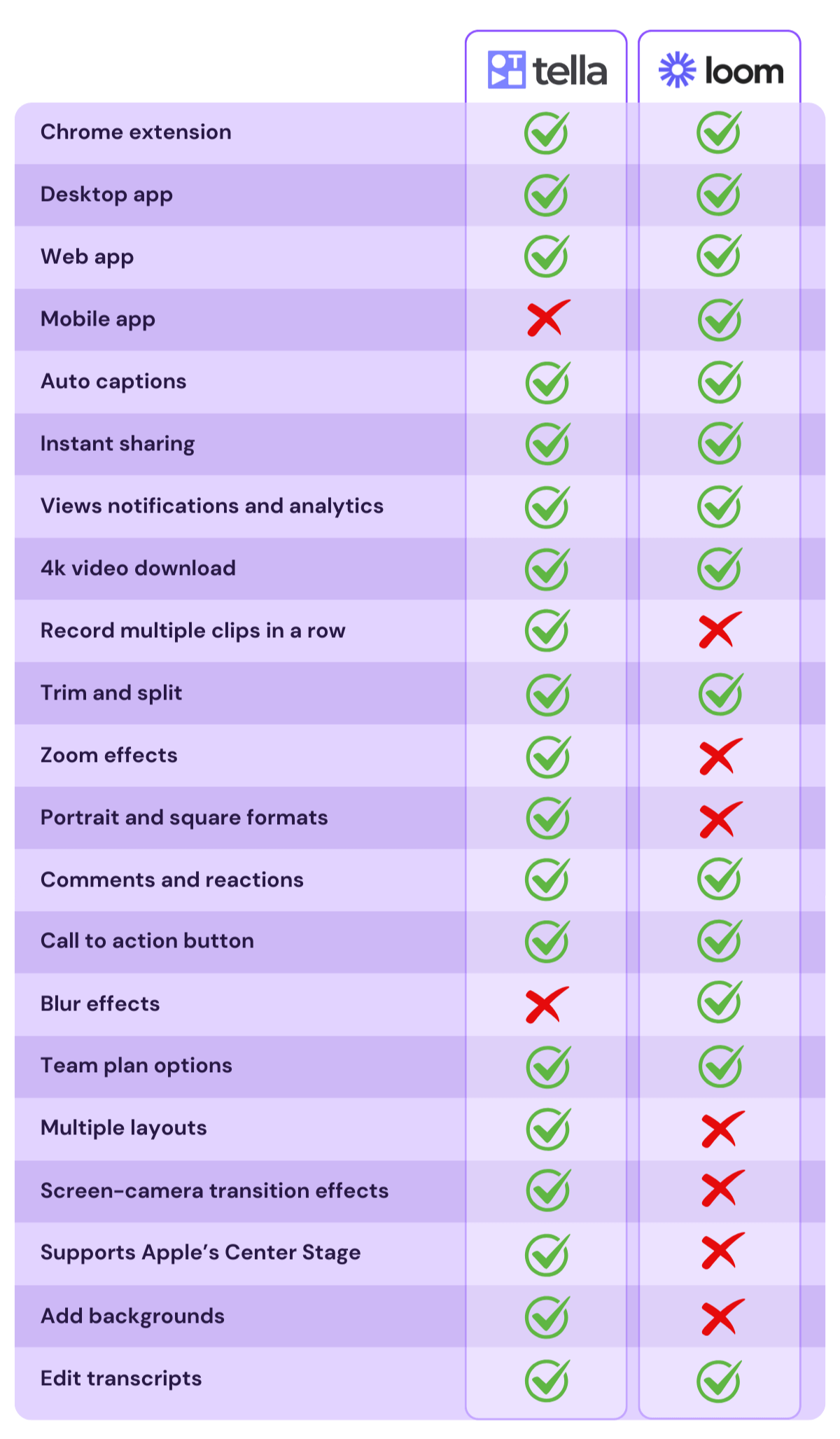
📢 UPDATE: Tella now offers blur effects, along with many other visual options, you can check out my video showcasing those further down on this post 🙂
Recording options
They both have Chrome extensions, web app and Mac app. The only difference between the two is that Loom has a mobile app, while Tella doesn't. Obviously the mobile app is not for screen recording but only video recording, and it's not a core use case, but it did happen once or twice that I recorded a Loom video on it.
Depth of Features
- Tella: Focuses on simplicity and creativity, combining screen recording with editing capabilities like layout changes, trimming export in different formats, zoom effects and more.
- Loom: Provides more features focused on productivity, especially with their AI add-on. They also offer a few things Tella doesn't (at least the the time of writing this) like drawing tools or blur effects.
Accessibility
- Tella: Offers unique value for videos that include both screen and camera or camera only. The platform allows for a larger display of the presenter in a variety of formats.
- Loom: The video recording display has only a few basic setting (two bubble sizes and minor elements around).
Transcription and Captions
- Tella: Provides captions with the nice visual effect of highlighting words in sync with your voice. You can export transcripts too.
- Loom: Offers captions and video transcriptions.
Neither tools offers much customization when it comes to captions (if you compare them with CapCut for instance, well... they're nothing like that!)
Additional Features
- Tella: Known for its creative approach, it's compared to a combination of Loom's simplicity and Canva's creativity. Tella is praised for its ease of use and the ability to make professional-looking videos quickly.
- Loom: Recognized for its comprehensive set of features and a more developed platform, having been around longer.
Use Cases
- Tella: Ideal for creating professional-looking course videos, webinars, feedback videos, social media and YouTube content emphasizing creativity and speed in video production.
- Loom: Suited for a wide range of video recording needs with its extensive features, making it a versatile tool for various professional and personal uses.
Performance
This is 100% anecdotal evidence so maybe don't rely on it too much...
However, I have experienced Loom failing twice: once by not processing the video, so only the first few seconds could be viewed, and once recording the video without audio (and I can ensure you the problem was not my setup but Loom). I never had any issues with Tella.
To be clear, I am not suggesting Loom is a more buggy tool, I honestly think they are both equally solid solutions and I just got unlucky with Loom a couple of times. So I included my experience here but it doesn't really mean much.
Video export speed
Now this one matters a lot if you often export videos to publish them on YouTube, LinkedIn, TikTok or whatever other platform you're using.
Here’s how Tella compares to other platforms when it comes to exporting 20-minute and 5-minute videos in 4k and 1080p respectively (these tests have been performed by Grant Shaddick, not me).
Exporting a 20 min video in 4K:
🥇 Tella: 1m 22s
🥈 Veed: 6m 30s
🥉 Premier: 13m 5s
🥄 Descript: 22m 27s
Those above are more editing tool rather than screen recorders. Below is a similar comparison but against screen recording apps.
Exporting a 5 min video in 1080p:
🥇 Loom: 11s*
🥈 Tella: 27s
🥉 Cap: 2m 22s
🥄 Screen Studio: 2m 37s
*Loom's export works a bit differently from Tella's, the file is mostly processed already in the background (whether you intend to export it or not) so the 11 seconds refers to the final step of performing the download.

As you can see, both Tella and Loom perform extremely fast exports, in fact you can export a 1-hour file in 4k in just about 2.5 minutes with Tella, which is really nothing. While Loom is a little faster, it's safe to say there really isn't much difference when it comes to counting seconds, and both perform extremely well compared to other screen recorders or video editing tools.
Pricing comparison
2026 PRICING UPDATE
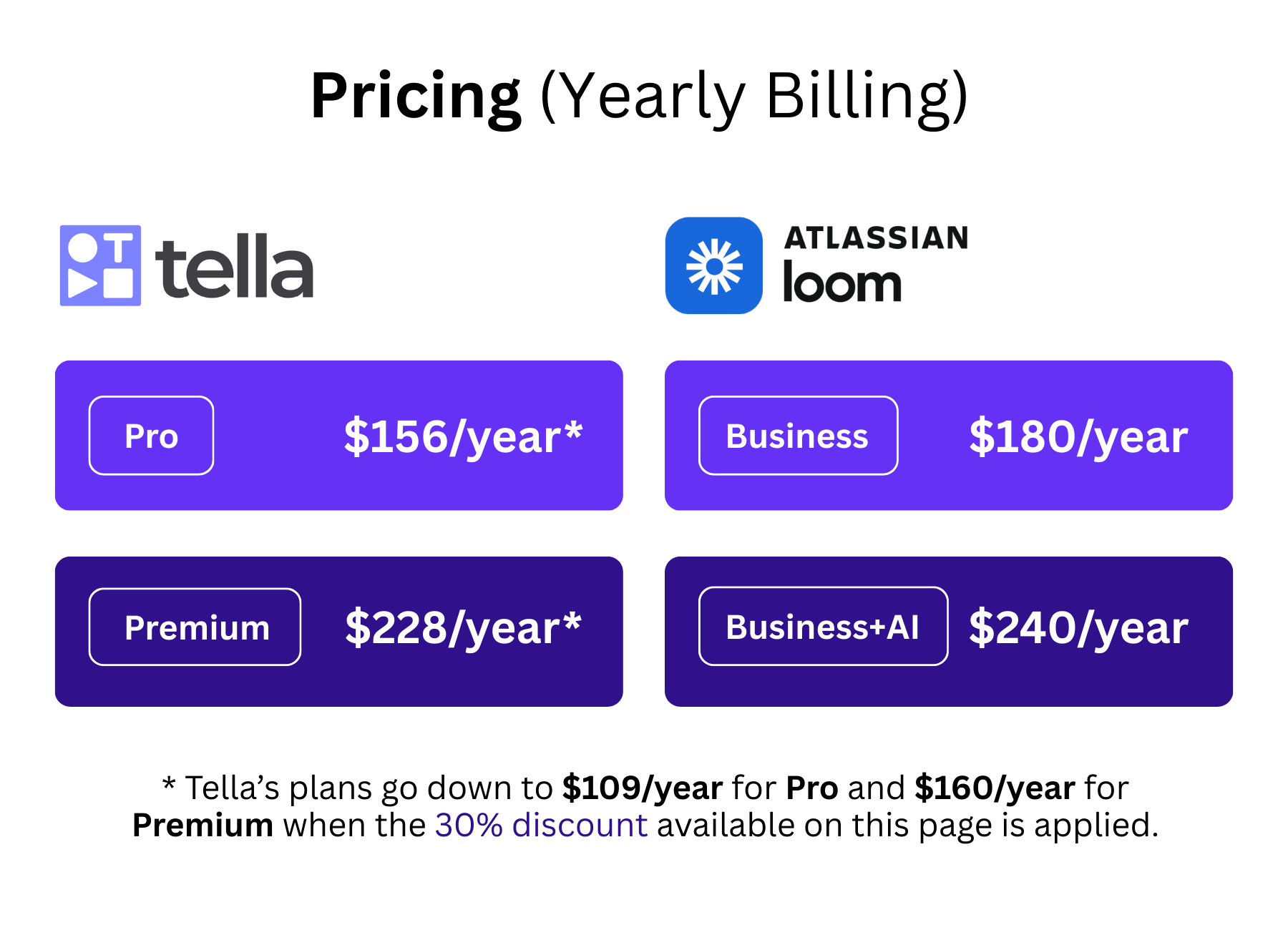
Loom offers a straightforward pricing model with two key components: the base subscription and an optional AI features add-on. The base subscription is priced at $18 per month when billed annually or $180 if billed monthly (this is an increase compared to the previous pricing starting at just $12.5/month),
In addition to the base subscription, Loom provides an AI features add-on for an extra $6 per month as part of their Business + AI plan. This add-on enhances the tool's capabilities, making it a worthwhile consideration for users looking to maximize their video communication experience.
Tella's standard pricing is set at $13 per month when billed annually or $19 per month for their Premium plan, which includes custom branding, custom domains, unlimited length on 60 FPS exports and more. The company actually reduced their pricing on plans billed yearly, and increased it for month by month billing - and since I am on the yearly plan, this was great news for me!
Keep in mind that if you sign up with this link, you will get 30% off so Tella will cost you only $109/year (Pro) or $160/year (Premium), so the difference with Loom widens significantly.
Free version and Free trial
Loom has a free forever plan, with some limitations, which is quite generous for occasional users.
The main limits of Loom's free plan are:
- 5 min recording limit per video
- 25 videos limit storage
- Max resolution 720p
- Can't download videos
Despite these limits, the free plan is pretty great if you use Loom only for internal communication, and not so intensively that you'd need to store more videos or record longer ones.
I personally used the free version for a long time before upgrading to a paid plan.
Tella unfortunately does not have a free plan, so freemium is not an option there.
Both companies offer a free trial: 14 days for Loom and 7 days for Tella.
product updates - March 2026
The product is evolving fast, so here's an update of new features they offer as of 2026.
In the video below, I'm showcasing 15 very cool features (many AI-powered) in 150 seconds - worth watching if you want to see what the platform is capable of!
Some highlights of what they shipped:
Cursor Tracking and Focus Effects
Tella includes built-in tools that help guide the viewer’s attention without manual editing. Auto-zoom automatically follows your cursor and zooms in on the action, which adds movement and makes tutorials easier to follow. You can also use the Highlight effect to dim the rest of the screen and draw attention to a specific area. If you accidentally expose something sensitive during recording, the Blur effect lets you mask parts of the screen afterward.
Smart Layout and Framing
Tella takes care of the visual composition so your videos look polished without extra effort. Auto-layout automatically arranges your screen and camera so everything stays balanced. If you want more control, Custom layouts allow you to resize and reposition your camera anywhere on the canvas. You can also fix framing issues after recording using the Camera frame tool, which lets you adjust your position if you were slightly off-center.
AI Editing
One of Tella’s biggest time savers is its AI-powered editing tools. The editor can automatically detect and remove mistakes (like repeated phrases), trim awkward buffers at the beginning or end of clips, remove long silences, and even detect and cut filler words such as “um,” “ah,” or “like.” These features dramatically reduce editing time while keeping your video tight and natural.

Audio Improvements
Tella also includes simple tools to improve the sound of your videos. Studio Voice enhances your audio using AI by isolating your voice and removing background noise or echo, making even basic microphones sound much clearer. You can also add background music directly in the editor to give your videos a more polished, finished feel. Check out the video above to see the difference with and without studio voice (the video was recorded using a RØDE NT-USB+).
Visual Styling
A few design touches can make recordings feel much more professional. Animated backgrounds add subtle motion behind your video instead of a static color. Tella also lets you apply Squircle borders to your camera frame, a smooth rounded-square shape commonly used in modern UI design. It's a weird small thing, but I like it!!
Automatic Cropping
Finally, Auto-crop helps clean up your recordings in one click. It automatically removes distractions like browser tabs, docks, or navigation bars so viewers only see the part of the screen that actually matters. I usually prefer to do this manually, but for quick videos for internal use it's a nice feature.
Final thoughts
I love Tella and if you sign up with this link you can get 30% off which makes it an amazing deal for any content creator (note that I may earn a commission too from that link).
I think Loom is still a great tool (and basically they created this category), and there are some scenarios where switching to Tella would not make sense.
However, in a lot of cases (and I am not the only one to say it), Tella is a better alternative overall, just as easy to use, and with lots of creative options when you need them.